
01 · SETUP & MAPPING
Map the site with the robot itself
The robot's LiDAR builds the map. Then mark pickup, drop-off, parking and charging points on it.
FLEET MANAGEMENT SOFTWARE
arsOSFM™
Map your site, build missions without code, and let arsOS FM assign tasks and manage traffic for every ARS robot on the floor.
Missions
newest first
This is a simplified demo to show how arsOS FM works. The real platform looks different.
ONE SOFTWARE
Not a set of separate tools. Mapping, missions, dispatch, traffic and records all live in arsOS FM.
01 · SETUP & MAPPING
The robot's LiDAR builds the map. Then mark pickup, drop-off, parking and charging points on it.
02 · TASK ALLOCATION
arsOS FM hands each mission to the best available robot automatically.
03 · TRAFFIC MANAGEMENT
Robots share aisles and crossings without blocking each other.
04 · MISSION LOG
Each mission is logged: what moved, when, and where it went.
NO-CODE MISSION BUILDER
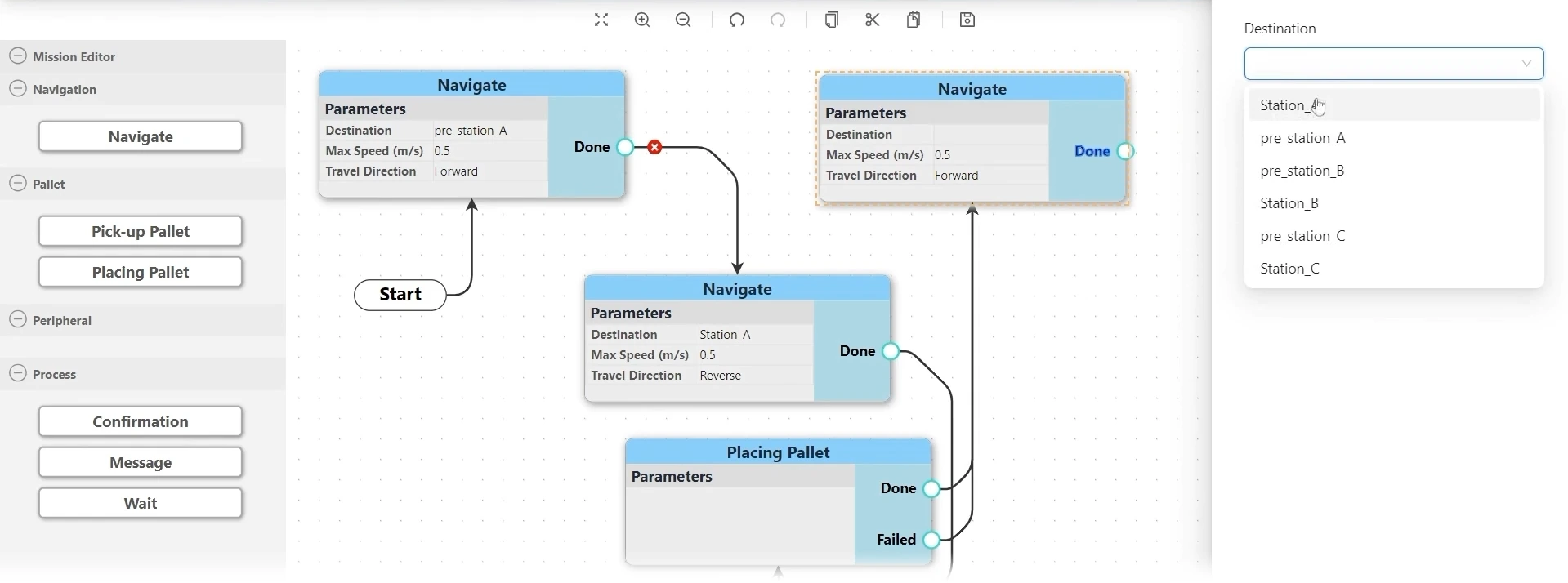
Add a block, set its parameters, connect it to the next. Your own team builds and changes missions, with no programming.
ADD BLOCKS
Navigate, Pick-up Pallet, Placing Pallet, Confirmation, Message and Wait.
SET PARAMETERS
Pick the destination from your mapped stations, then set speed and travel direction.
PLAN FOR FAILURES
Every step has Done and Failed outputs, so you decide what happens next either way.
HOW IT WORKS
The robot scans your site with its LiDAR and builds the map.
Place pickup, drop-off, parking and charging points on the map.
Chain simple steps into missions with the no-code builder.
arsOS FM assigns tasks, manages traffic and logs every mission.
CONNECTIONS
Run missions from arsOS FM on day one. Line call buttons or a link to your WMS, MES or ERP can be added later.
No. Missions are built from simple steps in the no-code mission builder, so operators and supervisors can set them up and change them.
Yes. You can start standalone and add line call buttons or a link to your WMS, MES or ERP later.
On an arsOS FM controller installed at your site, connected to your robots over Wi-Fi.
The licence is free for the first year with every ARS robot, then renewed yearly.
We simulate your site and a full shift to size the right fleet, then show it running in arsOS FM.